Privacy Repairer 1.5.0.0 Portable
This post was published 9 years ago. Download links are most likely obsolete. If that's the case, try asking the uploader to re-upload.
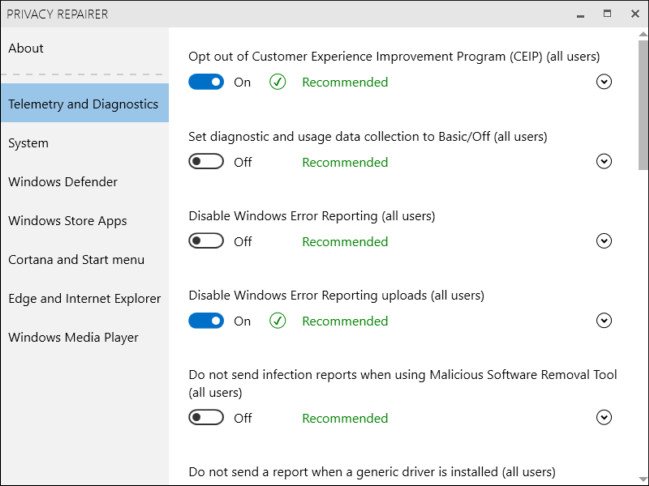
File Size : 3.5 Mb
Privacy Repairer is a tool for Windows 10 designed to protect your privacy.It comes with almost 60 options engineered to carefully modify your system in a way most beneficial for your privacy.
Stop spying and surveillance in Windows 10 using our free privacy restoring software. Comes packed with almost 60 options engineered to carefully modify your system in a way most beneficial for your privacy. It's very easy to use and all changes are safely reversible. It's the perfect one click solution for most users. Professionals can dig deeper and enable advanced options, such as configuring antivirus and SmartScreen to respect your privacy.
Key Features
Easy to use
Privacy Repairer is a breeze to use.No need to worry about complex and overblown interfaces, as each option comes with just a simple toggle button! And if you are ever lost, detailed information about every option is readily available.
And remember, all changes you make are always safely reversible!
Advanced options
Professionals may appreciate advanced options which significantly improve your privacy but may lower your security.
For example, disabling "SmartScreen for desktop" will stop leaking what software you download, but may open you to malware as your downloads won't be checked against an online reputation service.
Automation
To get you started as quickly as possible, we have carefully picked a selection of options which can be safely enabled all at once.
Advanced users are still strongly recommended to go through all the options individually.
Whats New
1.5.0.0 - 2017/05/15
Added an option to prevent Microsoft from using your diagnostic data.
Added an option to opt out of CEIP in Visual Studio 2017.
Fixed an access denied exception that occured when running the program under non-administrator user account in Windows 10 Creators update.
Fixed a multi-threading issue that occured when closing the program.
Error messages will now be displayed in English instead of being localized.
No longer displays dialog boxes when using the command line options.
A success message is now displayed when using the 'enable all recommended options' button.
Homepage
Quick check before we show the links
Helps us keep automated scrapers from hammering the filehosts.