SMPlayer 15.9.0 Stable Multilingual (x86/x64) + Portable
This post was published 10 years ago. Download links are most likely obsolete. If that's the case, try asking the uploader to re-upload.
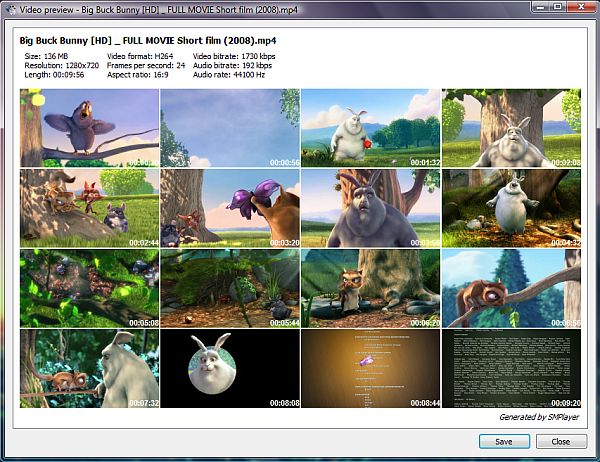
SMPlayer 15.9.0 Stable Multilingual (x86/x64) + Portable | 23.0/23.4/21.0/21.3 Mb
Media files, clips and songs come in an abundance of formats. With the available media players racing for greatest compatibility, choosing an application to enjoy movies is now just something related to visual preferences and ease of access. SMPlayer is one such media player, based on the popular MPlayer which is known to play nearly all available formats.
Lightweight and easy to use
When going through the setup process, take caution with each step, because you might end up with a different default search engine, as well as other potentially unwanted software installed. However, all of these offers can easily be declined in order to get just a fresh setup of SMPlayer.
Once the application runs you find no difficulty to accommodate. The interface is cleverly designed to feature both a modern and minimalistic look. Necessary playback options are clearly visible, as well as the volume and progress sliders, with the possibility to enhance the interface with several more elements.
Create and manage playlists
One of them is the playlist manager, which should not be missing from any basic or top of the line media player. It is brought up at the press of a button, floating on your desktop or docked to the main window for a compact overall interface.
The application gives you the possibility to load existing playlists to enjoy in the newly installed media player, as well as having one created from scratch and populated with some of the most commonly used audio and video formats, if not all available.
Enhance your audio and video experience
Since SMPlayer means business, it comes equipped with all it needs to be a respectable media player, as well as a bit more. Several enhancement tools are put at your disposal, such as an equalizer for sound and various video effects.
One of the most useful features when playing a movie, is an integrated subtitle finder which looks up desired items over Internet subtitle databases making sure it does not come back empty-handed. Additionally, you can also watch clips on YouTube without having to bring up a web browser.
In conclusion
Taking everything into consideration, we can say that SMPlayer is a suitable competitor in the race for media formats compatibility. It takes little of your system's resources, thus becoming available to a wide variety of configurations, while the friendly and modern interface gets you instantly up and running.
FEATURES
• Audio track switching. You can choose the audio track you want to listen.
• Seeking by mouse wheel. You can use your mouse wheel to go forward or backward in the video.
• Video equalizer, allows you to adjust the brightness, contrast, hue, saturation and gamma of the video image.
• Multiple speed playback. You can play at 2X, 4X... and even in slow motion.
• Filters. Several filters are available: deinterlace, postprocessing, denoise... and even a karaoke filter (voice removal).
• Audio and subtitles delay adjustment. Allows you to sync audio and subtitles.
• Advanced options, such as selecting a demuxer or video & audio codecs.
• Playlist. Allows you to enqueue several files to be played one after each other. Auto-repeat and shuffle supported too.
• Preferences dialog. You can easily configure every option of SMPlayer by using a nice preferences dialog.
• Possibility to search automatically for subtitles on the Internet
• Translations: currently SMPlayer is translated into more than 20 languages, including English, Spanish, German, French, Italian, Russian, Chinese, Japanese.
• Cross-platform.
New in version 15.9.0 (September 30, 2015)
• Support for the 3D stereo filter.
• We added support for mpv, which is a player based on MPlayer with new features and bug fixes.
• Now it's possible to select a secondary subtitle track which is displayed on top of the screen (mpv only).
• New option to set a template for screenshots (mpv only).
• Now it's possible to play videos from streaming sites (besides Youtube) like DailyMotion, Vimeo, Vevo and many more (mpv only).
• Option to step back one frame (mpv only).
• The Windows installer now allows to choose the playback engine to install: mplayer or mpv.
• Better support for YouTube (VEVO videos).
• Possibility to set a proxy.
• Allow duplicate items in the playlist.
• New action (assigned by default to key "I") shows the current playback time, total time and percentage, for 2 seconds on the OSD.
• Add the possibility to use the mouse buttons for "next chapter" and "previous chapter".
• New option to delete a file in the playlist from the filesystem.
• Add support for MPRIS2.
• Possibility to compile SMPlayer without mplayer or mpv support.
• The new H2O theme is now the default theme.
OS: Windows XP / XP 64-bit / Vista / Vista 64-bit / 7 / 7 64-bit / 8 / 8 64-bit / 2003 / 2008 / 2008 64-bit
Download
Uploaded - Installer x86
Uploaded - Portable x86
Uploaded - Installer x64
Uploaded - Portable x64
Mirror
Rapidgator - Installer x86
Rapidgator - Portable x86
Rapidgator - Installer x64
Rapidgator - Portable x64
Mirror
Turbobit - Installer x86
Turbobit - Portable x86
Turbobit - Installer x64
Turbobit - Portable x64
---
__ __ __ __ __ __ __ __ __