Complete Internet Repair 5.0.0.3758
This post was published 8 years ago. Download links are most likely obsolete. If that's the case, try asking the uploader to re-upload.
File Size: 2.2 Mb
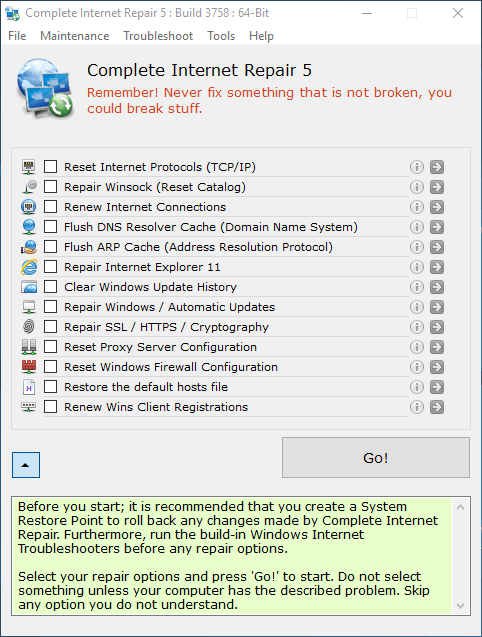
Complete Internet Repair is a program that you can use to fix common software problems related to Internet networking. It features intuitive options that can be tweaked by all types of users.
Tweaks related to Internet networking
Installing it shouldn't be an issue since you just have to follow a few basic steps. The interface of the program consists of a standard window where you have limited options.
So, you can reset the Internet Protocol, as well as repair Winsock, Internet Explorer, Windows automatic updates, SSL/HTTPS/Cryptography and the Workgroups Computers view.
Flush DNS, clear Windows update history, and more
But you can also renew Internet connections, flush the DNS resolver cache, clear the Windows update history, reset the Windows firewall configuration and restore the default "Hosts" file.
Furthermore, you can access an event viewer (e.g. summary of administrative events, recently viewed nodes, log summary), open the logging directory and file, as well as view the Winsock LSPs. In the "Preferences" menu, you can disable logging or set the maximum log size.
Easy-to-use and practical PC tuner
The program uses a very low amount of system CPU and memory. There is no help file available but that's because Complete Internet Repair provides simple one-click solutions. No errors have been displayed during our tests. Keep in mind though, that each fixed problem requires a computer reboot before effects become visible.
All in all, Complete Internet Repair is a very good program for repairing Internet networking problems and we strongly recommend it to all users.
What's New in version 5.0.0.3758 (November 26, 2017)
• Fixed crash if Windows Taskbar is not docked at the bottom
• Updated translation headings. More descriptive
• Translated Preferences
• Tweaked the PReferences Dialog a little
• Added en.ini Language file
• Innitial 'DPI aware' tests
OS: Windows 7 / 8 / 10 (32/64-bit)
Homepage
Quick check before we show the links
Helps us keep automated scrapers from hammering the filehosts.