Disk Sorter Ultimate 8.0.16 (x86/x64)
This post was published 10 years ago. Download links are most likely obsolete. If that's the case, try asking the uploader to re-upload.
Windows Software | Disk Sorter Ultimate 8.0.16 (x86/x64) | 17.94 MB
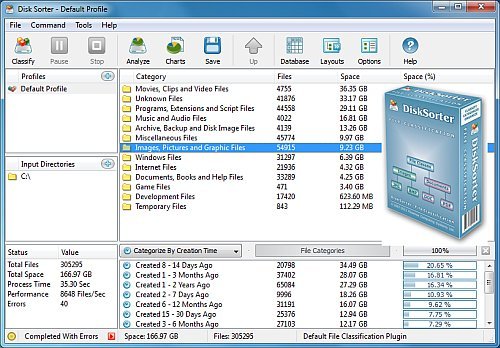
Disk Sorter Ultimate is a lightweight and straightforward file classification utility that helps people detect files on most types of drives, as well as manage them by various criteria in order to create more space on the disk. This application enables you to search through 500.000 files, having a storage capacity of 2TB. In order to start classifying, all you have to do is select a directory, drive or server and click the “Classify” button. You should know you can search for specific types of files, such as hidden or usual video, audio or image files, according to the modification date, creation time or user.
After scanning is over, all the files are going to be displayed in the main window with details such as category, number of files in each folder, and size (dimension and percent). You can also categorize all the items by extension, file size, creation time, user name, or last access date.
The program enables you to create a maximum number of 3 profiles, where it is possible to save details, such as scan location(s), type of classification and name.
The interface of the application has a modern-looking design, and it is highly intuitive, thus enabling any type of person to work with it without encountering issues, no matter their previous experience.
In conclusion, Disk Sorter is a very useful piece of software that has built-in management tools, support for a huge amount of file classes and groups, long and Unicode names, and UNC Network path names.
Whats New in version 8.0.16
DiskSorter v8.0 adds the ability to search files in file classification results by the file name, extension, full path, file category, file size, file attributes, creation, last modification and last access dates. In addition, the new product version adds the ability to use environmental variables in input directories, improves all types of file classification reports and fixes a number of bugs.
Adds the ability to search files in file classification results
Adds the ability to use environmental variables
Improves all types of file classification reports
Fixes a number of bugs
Homepage
Homepage
