LameXP 4.12 Build 1818 Final-1 + Portable
This post was published 10 years ago. Download links are most likely obsolete. If that's the case, try asking the uploader to re-upload.
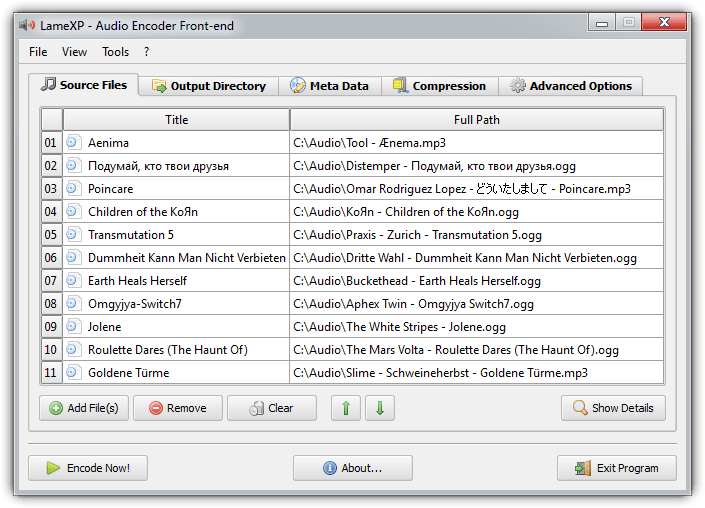
LameXP 4.12 Build 1818 Final-1 + Portable | 22.1/21.8 Mb
LameXP is an audio encoding/conversion program with a skinnable, drag-and-drop interface, a variety of format input and outputs, as well as quality controls. The program can edit metadata, create an automatic playlist file, and modify audio with multi-threaded batch processing tools for normalization and tone adjustment. Although named for one of its popular encoders (the LAME MP3 encoder), the program can also export to OGG, FLAC, AC3, Opus, and experimental DCA. MP4/AAC encoding available via an external codec (NeroAAC). Can convert from a wide variety of formats including MP3, OGG, FLAC, MP4/AAC, AC3, DTS, WavPack, Musepack, TTA, Speex, Monkey's Audio, Shorten, WMA, Opus, and more.
Straightforward layout
In the user-friendly interface you can add a file to encode (it also supports batch conversion), but you can also use the drag-and-drop support while you are browsing for files in Explorer (a floating drop box is displayed on the lower right corner of the screen).
Edit metadata and create playlists
Once you have specified the output destination, you can edit metadata (it will supersede data from the source), enable or disable LameXP to automatically generate a playlist file (M3U), as well as configure compression and advanced options.
Conversion options
The format of the converted file can be MP3, OGG, Aften A/52, FLAC or WAV. In order to convert to AAC, you need to manually download the codec files in the LameXP installation files.
In addition, you can select rate control method (quality-based, average bitrate, constant bitrate), and adjust the quality/bitrate ratio (from level 0 to 9).
Advanced configuration settings
If you are an advanced user, you can also adjust the LAME algorithm quality - from poor quality (very fast) to best quality (very slow), enable bitrate management for LAME and OggEnc2, select sampling rate and MP3 channel mode, enforce stereo down mix of multi-channel sources, enable volume normalization filter, adjust treble and bass, set a rename pattern, adjust multi-threading, and more.
Performance
We tested LameXP by converting one 8.19MB MP3 file to WAV and FLAC. We used the default settings, and LameXP managed to successfully convert the files in remarkable time (only a few seconds). The output files weighed 57.8MB (WAV) and 45.7MB (FLAC).
It even alerts you with sound when the task is completed, and during conversion you can view overall CPU usage (which is low) and physical RAM usage.
Bottom line
In conclusion, LameXP is an excellent application for converting audio files, and we strongly recommend it to all users.
New in version 4.12 (October 23, 2015)
• Upgraded build environment to Microsoft Visual Studio 2013 with Update-5
• Updated Qt runtime libraries to v4.8.7 Final (2015-05-25), compiled with MSVC 12.0
• Added support for building LameXP and MUtilities with Visual Studio 2015
• Added Hungarian translation, contributed by Zityi's Translator Team <[email protected]>
• Added optional support for the libfdk-aac encoder, using the fdkaac front-end by nu774
• Added detection of the 64-Bit version of QAAC encoder, requires 64-Bit Apple Application Support
• Added enhanced file renaming option: Default file extensions can now be overwritten
• Added enhanced file renaming option: Files can now be renamed via the regular expression engine
• Added capability to select multiple files on "Source Files" tab
• Updated Vorbis encoder to OggEnc v2.87 (2015-08-03), using libvorbis v1.3.5 and aoTuV b6.03_2015
• Updated MediaInfo to v0.7.76 (2015-08-06), compiled with ICL 15.0 and MSVC 12.0
• Updated mpg123 decoder to v1.22.4 (2015-08-12), compiled with GCC 5.1.0
• Updated ALAC decoder to refalac v1.47 (2015-02-15), based on reference implementation by Apple
• Updated Monkey's Audio binary to v4.16 (2015-03-24), compiled with ICL 15.0 and MSVC 12.0
• Updated WavPack decoder to v4.75.0 (2015-05-25), compiled with ICL 15.0 and MSVC 12.0
• Updated GnuPG to v1.4.19 (2015-02-27), compiled with GCC 4.9.2
• Fixed potential deadlock in Cue Sheet import dialog when "Browse..." button is clicked
• Fixed function to restore the default Temp folder, if custom Temp folder doesn't exist anymore
• Fixed parsing of command-line parameters, regression in MUtilities library (LameXP v4.12 RC-1)
• QAAC encoder is now using --cvbr instead of --abr when "ABR" mode is selected
• Enable the embedding of cover artwork for Opus encoder (opusenc), using the --picture option
• Some installer improvements have been implemented (especially in "update" mode)
• Full support for Windows 10 RTM (Build #10240)
• Updated language files (big thank-you to all contributors !!!)
System Requirements: WinXP / Vista / Win7 / Win8 / Win10 / Wine
Download
Uploaded - Installer
Uploaded - Portable
Mirror
Rapidgator - Installer
Rapidgator - Portable
Mirror
Turbobit - Installer
Turbobit - Portable
__ __ __ __ __ __ __ __ __