FreeCommander XE 2015 Build 700 Beta Multilangual and Portable + chm Help files
This post was published 10 years ago. Download links are most likely obsolete. If that's the case, try asking the uploader to re-upload.
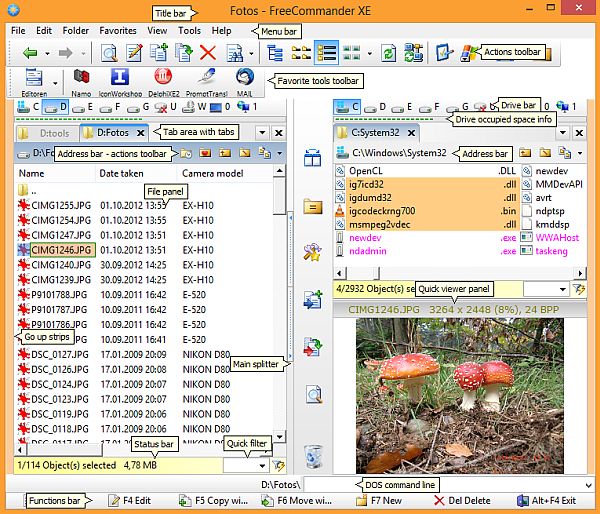
FreeCommander XE 2015 Build 700 Beta Multilangual and Portable + chm Help files | 13.4/32.8 Mb
FreeCommander is an easy-to-use alternative to the standard windows file manager. The program helps you with daily work in Windows. Here you can find all the necessary functions to manage your data stock. You can take FreeCommander anywhere – just copy the installation directory on a CD or USB-Stick – and you can evenwork with this program on a foreign computer.
Main features
• Dual-panel technology – horizontal and vertical (one panel possible too)
• Tabbed interface
• Full access to desktop
• Optional tree view for each panel
• Built-in file viewer to view files in hex, binary, text or image format
• File viewer and thumbnail view inside archives too
• Built-in archive handling: ZIP (read, write)
• Nested archive handling
• Plugins for other archive (RAR, 7z, …)
• Plain view – structureless view for files and folders
• Linked browsing
• Easy access to system folders, control panel, desktop and start menu
• Copy, move, delete, rename files and folders (alternatively as Windows or FreeCommander operation)
• Drag&drop
• File searching (inside archive too)
• Create and verify MD5 checksums
• Wipe files
• Multi rename tool
• File properties and context menu
• Calculation of folder size
• Folder comparison
• Folder synchronization
• Modification of file date and attributes
• Folder / program favorites
• File filters (regexp possible too) for display and file operations
• User defined columns for detailed views
• DOS command line
• Quick viewer
• Quick search
• Quick filter
• Quick starter
• Screenshots
• All shortcuts are definable
• A lot of settings – you can configure almost all
• Multiple language support
New in version 2015.700 Beta (2015-10-23)
- New option for quick filters - 'Predefined quick filters'
- New actions for predefined quick filters - for example: Show popup menu for quick filters
- New option to define in the freecommander.ini - 'PrefixForBackupSubfolderNames', the default value is 'Bkp_Settings_'
- New favorite tool option - 'Delimiter character for selected items - space is default' and 'Enclose each selected item with "'
- New favorite tool parameter 'Selected items as drag&drop' - %ActivSelAsDrag&Drop%
- New option to define in the freecommander.ini in the Section [dlgInputBox]: AutoComplete=0. With AutoComplete=1 will be auto completion activated in e.g. "Go to folder", "New folder" dialogs.
- DOS-Prompt specification - now %ActivDir% variable is enabled
- Default column profile works with network shares too
- All history sections transfered to the new freecommander.hist.ini
- "Make folder/file list" function implemented
- Start filter mask with "-[]:" if you want use [] as literals
- > > > > > > >
Recommended minimum system requirements for FreeCommander
• Windows XP, Windows Vista, Windows 7, Windows 8, Windows 10 – 32 or 64-Bit
• 2 GB RAM
• 100 MB hard disk memory
• 1024×768 display resolution
Language Help files: English, German, Spanish, Dutch, Portuguese-Brazil
Languages interface (32): English, German, Spanish, Italian, French, Danish, Dutch, Polski, Portuguese, Russian, Turkish, Japanese ...
FreeCommander XE 2015 Stable version 2015.685