Lunarship Software Phototheca 1.6.0 Build 1243
This post was published 10 years ago. Download links are most likely obsolete. If that's the case, try asking the uploader to re-upload.
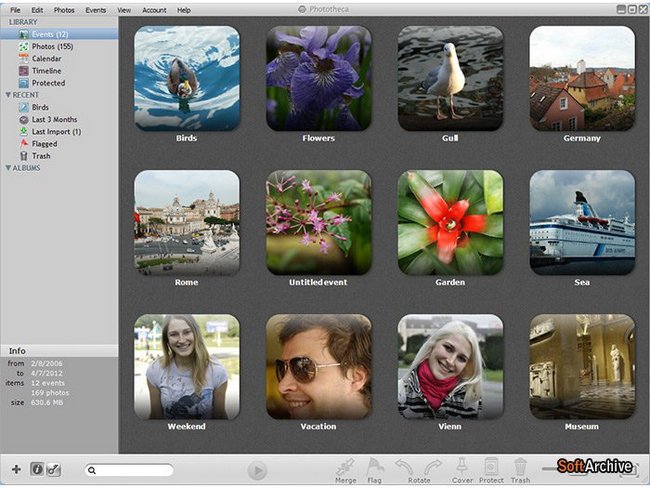
Windows Software | Lunarship Software Phototheca 1.6.0 Build 1243 | 14.5 MB
Phototheca is the most convenient tool for organizing and structuring photos. Do you want to bring in order thousands of your photos? Phototheca is the most convenient tool for organizing and structuring photos. It`s very easy-to-use - just create and populate events, albums and smart albums. With this program you can tag your friends on photos, add keywords and places where photos were taken, and filter by camera model and the date.
Correct wrong time stamps on photos if camera had wrong date setup. Build your own photo library refined and transparent, structured a way you like.
Features
Import from everywhere
Many photo sources are supported — import from local drives, network shares, memory cards, removable drives, USB sticks, cameras, cell phones, tablets
When you import photos from memory cards of your camera – Phototheca can detect photos are imported earlier and don’t import them again - so no duplicates appear on your drive.
Import from network shares is available as well. There is option to don’t copy photos from network and remember locations of such photos only. When someone makes changes to that photos, Phototheca detects that changes and reimport photos automatically in silent mode. So changes made by others appears in your library in a few moments without extra efforts.
Phototheca is intelligent enough to remember all folders on your drives what have been imported before and tracks content of those folders for changes or new photos. When new photos appears in such folders — they are imported automatically.
Organize like a pro
Phototheca gives you the powerful toolset to organize your photos in plenty different ways. You can use Events, Albums, Smart albums, Live albums and Folders.
Events are groups of photos what represent shots were taken around the same time and place, like a vacation or birthday. Phototheca assembles photos in events during an import based on specified option how to split photos. It may be split by folder or by time, when photos are shot in same time frame makes a one event.
Albums are collections of photos what have no time frame. You can collect photos of your child or pet from different events and put those photos into a single Album to be able review all those photos in one place in case you don't care when those photos were taken. A single photo can resides in many Albums and Events giving no limits to ways you want organize photos.
Smart albums — is another handy feature. Smart Album - it's an album what is populated by Phototheca automatically basing on specified criterias — it is like a saved search query. Let's say you want to have all photos are made by specific camera in a single album - you create a Smart Album with criteria "Camera model" or you want to have all photos are made during last year in a single album - you create a Smart Album with specified date range.
Live Albums can be used when you need to monitor content of some folders on your disk or network share and want photos from those folders appear in Phototheca automatically as they appear in those folders. If those photos have been edited with other applications — all changes will be recognized by Phototheca and appears in your library automatically. Even new keywords and tags.
View with comfort
Switch to full-screen mode with single click and all distractions disappear. Utilize every inch of your display to see more. Browse events and albums, go from picture to picture with photostripe with no excessive panels - just your photos. Change size of thumbnails with slider to view more or bigger thumbnails, adjust height of photostripe when viewing a single photo.
Run slideshow easily from anywhere. Basic photo edit capabilities are available while running slideshow. You can also setup pause time between the frames to make the show even more relaxed and enjoyable.
More ways to browse photos
Search
Use search box for instant search of photos in your library. It works with photo titles, descriptions and keywords. No any delay and search results appear immediately when you hit Enter key.
Calendar
There is a nice Calendar view inside Phototheca with three different layouts. In this case all your photos are represented in calendar’s grid, where you can scroll back and forth and switch between month, year or all years scales, reviewing your life story in your photos.
Timeline
Timeline is a chart with bars what show amounts of your photos per day. It lets easy review when and how much photos you shot in the history and jump directly in the every single day.
Photo tagging and metadata support
Keywords, EXIF and IPTC
Together with photos Phototheca imports some metadata: description, keywords, time stamp, camera model and orientation. These metadata is used for search and filtering later.
With Phototheca you can modify keywords and descriptions of photos and all changes will be written into JPEG file according to IPTC standard, giving possibility to access them in other applications or on photo hosting sites.
If you have photos with incorrect time stamps due to missed camera setup — Phototheca can easily help you to write a correct time into JPEG, doing this for multiple files in one go. Time will be shifted accordingly so order of photos will not be broken.
Other advanced features
Duplicates
Phototheca detects all duplicates in the photo library and gives a way to remove them and check where duplicates are stored on a disk.
Protected photos
There is way to hide some photos into password protected Safes. If you want to keep some photos in your library with no chance other can accidentally spot them, just move such photos into a safe, protect with a password and photos become invisible in the library.
Export
With Phototheca you can easily export part of your library onto other place. Photos, albums and events can be exported in any combination.
Updates: official site does not provide any info about changes in this version.
Homepage
Homepage
