KeyCue 9.8 Multilingual macOS
This post was published 5 years ago. Download links are most likely obsolete. If that's the case, try asking the uploader to re-upload.
Languages: Multilingual | File Size: 4.9 MB
KeyCue helps you to use your macOS applications more effectively by displaying a concise table of all currently available menu shortcuts. You no longer need to memorize and remember key combinations; just press the command key and KeyCue tells you what you want to know. Over time, you will automatically remember frequently used shortcuts and start working more efficiently.
KeyCue gives you an instant overview of the overall functionality of any application, plus lets you automatically start working more efficiently by making use of menu shortcuts.
Besides that, KeyCue is your best friend when it comes to type emojis. It shows a table of all available emoji characters and lets you insert any emoji with a simple click.
You can find emoji characters by keyword or choose from the list of recently used emojis. Finding and typing your desired emoji has never been easier.
- Get an instant overview of all shortcuts in any application
- Explore and type emojis
- Quickly access folder contents
- Access frequently used URLs
- System-wide hotkeys made visible
- Automatically omit known shortcuts to keep the shortcut table small
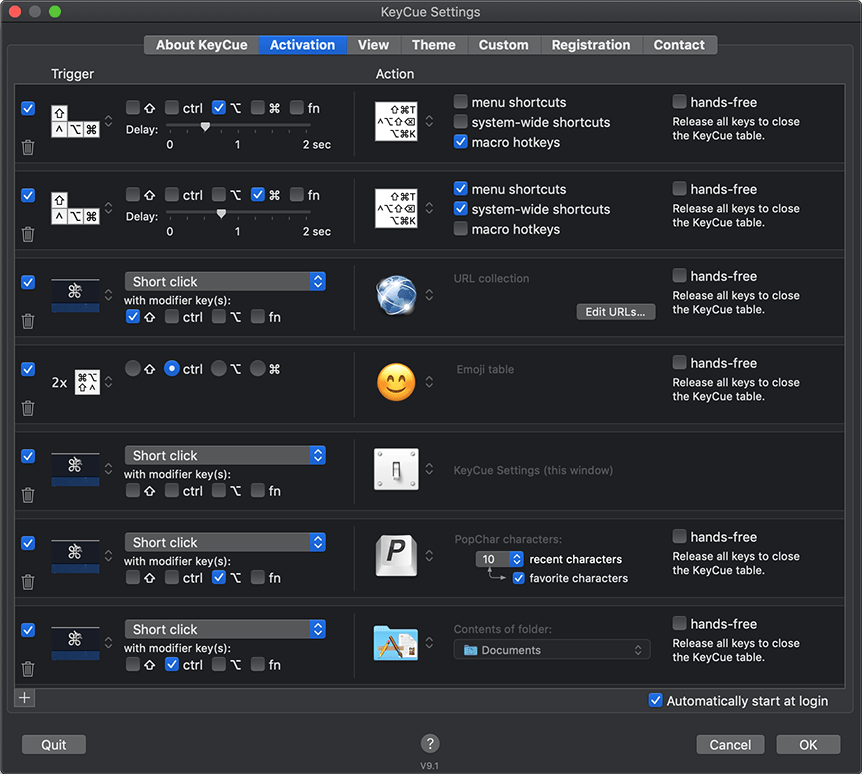
- Flexible triggers and actions
- Search for commands and shortcuts
- Integration with PopChar X lets you display and insert special characters
- Display and insert Typinator snippets
- Themes for customizing the appearance of the shortcut table
- User-definable custom shortcut descriptions reveal hidden keyboard shortcuts
- Manually omit known shortcuts
- Show Keyboard Maestro, QuicKeys, and iKey shortcuts
- Legend for keyboard symbols
- Accessible via menu bar icon
- Open interface for 3rd party applications
RELEASE NOTES
- KeyCue is now ready for Big Sur.
- Files and folders can be suppressed in the folder view by prefixing their names with a dash or by attaching the Finder tag “-KeyCue” to them.
- In theme definitions, group and menu headings can now have an "align" attribute with the values "left", "center", and "right".
- Improved visibility of the KeyCue icon in the translucent menu bar of Big Sur.
- In the folder view, items are now sorted in the same way as in the Finder (in particular, with correct order for items that contain numbers).
- Works around a problem in Trello, where menu shortcuts were no longer displayed after invoking KeyCue several times.
- Fixes a problem where the contents of suppressed folders still showed up in the folder view.
- Fixes an inconsistence in the representation of group headings in themes.
- Fixes a rare crash when KeyCue learned two shortcuts that were typed in quick succession.
Interface languages: Deutsch, English, Français.
System Requirements
OS: macOS 10.8 - macOS 11.0
Screenshots
Homepage
Quick check before we show the links
Helps us keep automated scrapers from hammering the filehosts.